
HWMonitor
Real-time hardware sensor monitoring for your PC. Temperatures, voltages, fan speeds, power, and clocks—in one clear view.
Clean, lightweight, and trusted by enthusiasts, overclockers, and IT professionals worldwide.
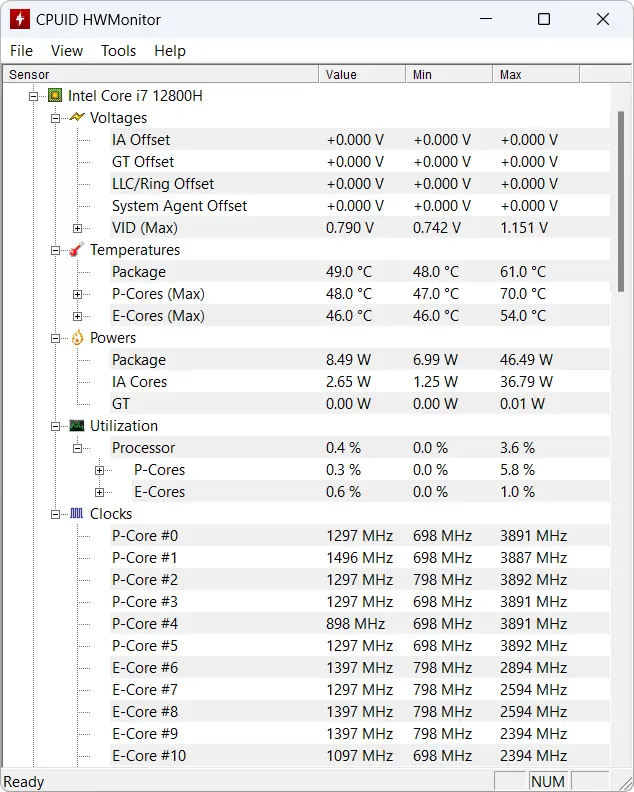
What is HWMonitor?
HWMonitor is a hardware monitoring program that reads your PC’s main health sensors: voltages, temperatures, powers, currents, fan speeds, utilization, and clock speeds where supported. It handles CPU on-die and per-core thermal sensors, drive temperatures via S.M.A.R.T. (SSD/HDD), GPU temperature and—where hardware supports it—GPU power. It can also monitor memory modules with thermal sensors and show battery information on laptops. If you searched for Process Hacker, a system monitor, or a task manager alternative, HWMonitor is a different category: it focuses on hardware sensors rather than processes.
Key Features
Everything you need to keep an eye on system health. See full breakdown →
Temperatures
CPU core and package, GPU, drives via S.M.A.R.T., and motherboard sensors.
Voltages
Rail voltages from supported chips (ITE, Winbond, Nuvoton) and CPU/GPU where exposed.
Fan Speeds
RPM from chassis and CPU fans, with min/max/current values.
Power & Current
CPU/GPU power and current where supported; PSU monitoring on compatible units.
S.M.A.R.T. Drives
SSD and HDD temperatures and health attributes via S.M.A.R.T.
Logging & Export
Copy readings, save to TXT, and CSV logging for analysis and reports.
Portable ZIP available—run from a folder or USB with no installation. Download options →
Explore HWMonitor
Jump to the section that matters most. Each page has detailed content and clear next steps.
Features
Full breakdown of what HWMonitor can do: component inspection, system monitoring, performance insights, and sensor support.
- Component & sensor inspection
- System monitoring (CPU, GPU, drives, chips)
- Compatibility & native sensor support
Download
Get the latest HWMonitor 1.62: Installer (Setup) or Portable ZIP. Verify source and integrity before installing.
- Installer & Portable ZIP
- Integrity & checksum guidance
- Antivirus false-positive tips
Guides
Step-by-step troubleshooting: install, uninstall, CPU temps, TMPIN, GPU power, S.M.A.R.T., export logs, and antivirus checklist.
- Installation & uninstall
- Reading sensors & interpreting data
- Reporting bugs & best practices
FAQ
Answers to common questions: CPU temps, GPU power, TMPIN, portable version, PRO, Process Hacker vs HWMonitor, and antivirus safety.
- CPU & GPU temperature accuracy
- Portable version & PRO difference
- Safe download & antivirus
Trust & Security
Legal use, ethical use, transparency, trusted downloads, avoiding repacks, and PRO remote monitoring with consent.
- Legal & ethical usage
- Verify publisher & source
- No malware; safe practices
Download Options
Installer or portable—get the right build for you. Full details and integrity steps on the Download page.
Installer (Setup)
Recommended for most users. Start Menu & uninstall.
Portable (ZIP)
No install. Run from folder or USB.
Features Snapshot
Component and sensor inspection, system monitoring, performance insights, and broad native sensor support—no process lists, no task manager features. HWMonitor stays focused on hardware.
Learn more about featuresDownload & Integrity
Get HWMonitor from the official vendor or reputable mirrors. Verify source, check file properties or hashes when provided, and follow our antivirus false-positive guidance so you install with confidence. See Technical reference for verification commands and registry info.
Download & verifyQuick Fix Guides
Step-by-step help when you need it.
- Installation (Installer vs Portable) and uninstall steps
- Reading CPU temperatures: package vs core, what to watch under load
- Understanding TMPIN sensors and mapping with motherboard docs
- GPU temperature vs MSI Afterburner; GPU power (PCIe + connectors)
- Exporting logs (TXT and CSV) and reporting sensor bugs
- Antivirus warnings checklist and safe download practices
Top Questions
Quick answers; full FAQ has more detail and related guides.
- Is HWMonitor accurate for GPU temperatures? (Generally yes; compare with a second tool if needed.)
- Can HWMonitor show GPU power? (Yes, when hardware supports it—PCIe + aux connectors.)
- What are TMPIN readings? (Motherboard temp sensors; check your board docs to map them.)
- Which CPU temp to focus on? (Package and hottest core; keep under 90–95°C under load for most CPUs.)
- Portable version? PRO difference? Process Hacker alternative? Safe to download? (All covered in FAQ.)
Trust & Ethics
Legal and ethical use, transparency (what you can verify), trusted downloads, avoiding repacked installers, and responsible use of PRO remote monitoring in authorized environments only.
Read Trust & SecurityWho Uses HWMonitor?
Developers
Validate cooling under heavy compile loads and long build sessions.
IT & Admins
Quick diagnostics and fleet checks. HWMonitor PRO adds remote monitoring over the network for authorized environments.
Overclockers & Power Users
Stress testing, stability checks, and tuning with real-time min/max tracking.
Laptop Users
Battery status and thermals to avoid throttling and overheating.
How HWMonitor Compares
Qualitative comparison with other tools in the same category. No benchmark numbers—pros and cons by focus.
| Tool | Footprint | Simplicity | Sensor coverage | Logging | Portable |
|---|---|---|---|---|---|
| HWMonitor | Lightweight, quick to open | Clear tree UI; some learning curve | Strong (CPU, GPU, drives, common chips) | TXT + CSV | Yes (ZIP) |
| HWiNFO | More features, heavier | Dense; very detailed | Very wide | Extensive | Yes |
| MSI Afterburner | GPU-focused | Familiar to gamers | GPU + limited system | Yes | Yes |
| SpeedFan | Light | Dated UI; fan control | Older chips, variable | Basic | Yes |
Trust & Transparency
- Official downloads: Get HWMonitor from the official vendor (CPUID) or reputable mirrors.
- Integrity: Verify file properties and compare hashes when the vendor provides them.
- No bundlers: The official installer does not bundle unwanted software.
- False positives: Hardware monitoring tools can trigger antivirus heuristics; see our Guides and Trust & Security for safe steps.
This site is an independent software authority guide. We are not affiliated with CPUID. Read more →